
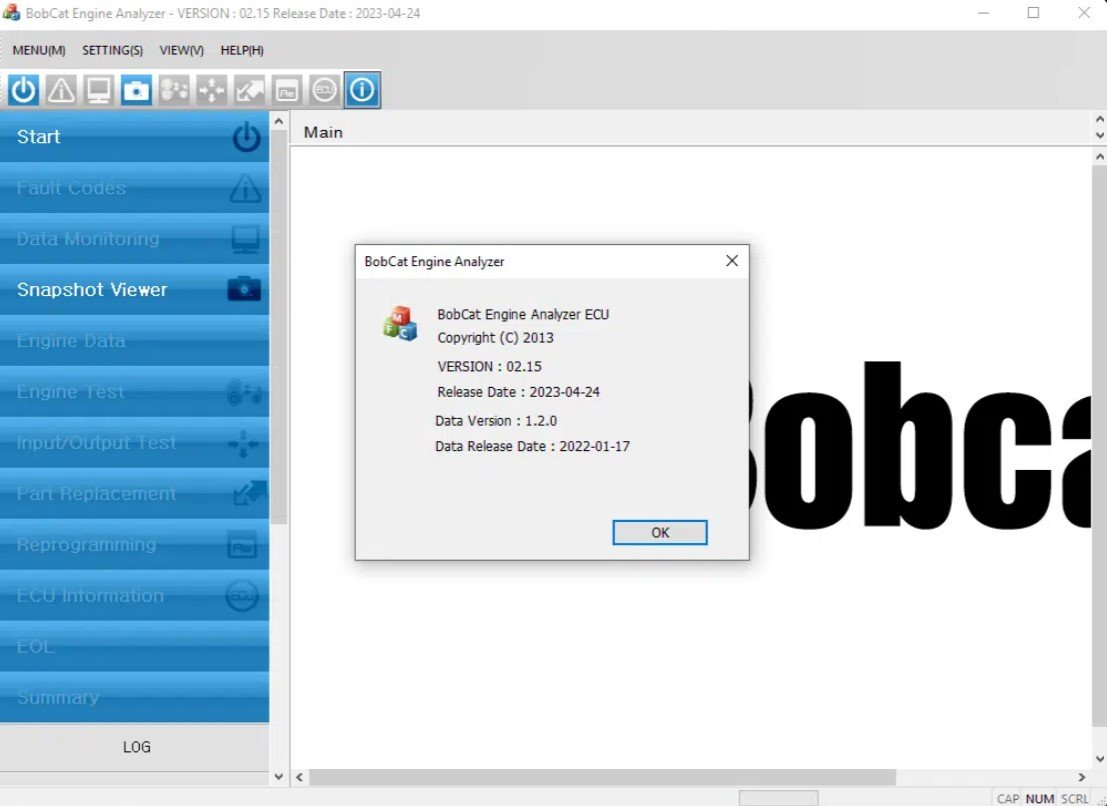
bobcat scan tool – (ECU 02.15.2023)
The bobcat scan tool is the official diagnostic software designed to provide factory-level access to the electronic control units (ECUs) of Bobcat machinery. This latest edition (ECU 02.15.2023) offers technicians and fleet managers an advanced solution for maintaining skid-steer loaders, compact excavators, telehandlers, utility vehicles, and Bobcat/Doosan industrial engines.
Unlike generic OBD readers, the bobcat scan tool communicates directly with Bobcat ECUs, enabling users to read and clear fault codes, perform actuator tests, execute factory calibrations, and generate PDF reports. It also integrates specialized ECU diagnostic protocols, making it the most accurate and reliable choice for Bobcat service environments.
👉 With the bobcat scan tool, workshops reduce downtime, improve accuracy in repairs, and maximize equipment uptime.
The Problem It Solves
Workshops often face challenges when servicing Bobcat equipment with non-official tools:
-
❌ Limited data: generic scanners show only basic OBD parameters without full access to engine or hydraulic ECUs.
-
❌ No calibration support: critical after replacing sensors, pumps, or joysticks.
-
❌ Intermittent faults missed: without real-time monitoring, technicians fail to detect hidden issues.
-
❌ Increased downtime: longer repair times mean higher operational costs.
-
❌ No official reporting: lack of structured documentation for fleet or warranty claims.
✅ The bobcat scan tool solves these problems by:
-
Providing full ECU coverage across engines, hydraulics, and transmissions.
-
Supporting factory calibrations for throttle, joystick, and hydraulic pumps.
-
Delivering live data streams for real-time diagnostics.
-
Producing PDF reports to document before/after results.
-
Ensuring official compatibility with RP-1210C adapters like Noregon DLA+ 2.0.
Key Features of bobcat scan tool
-
✅ Fault Code Management: Read and clear DTCs with detailed explanations.
-
✅ Live Data: Monitor RPM, oil pressure, coolant temperature, hydraulic flow, sensor activity.
-
✅ Actuator Tests: Trigger valves, injectors, fans, and solenoids.
-
✅ Calibrations: Factory-level routines for throttle, joystick, hydraulic pumps, and transmission.
-
✅ ECU-Specific Functions: Direct access to Bobcat ECU modules, including Doosan industrial engines.
-
✅ PDF Reporting: Create exportable documentation for fleets, warranties, and audits.
-
✅ Multilingual Interface: Supports English and multiple languages.
-
✅ RP-1210C Adapter Support: Works with Noregon, Nexiq, and DG Tech adapters.
👉 The bobcat scan tool is not just diagnostic software—it’s a complete professional solution.
Extended Compatibility
Supported Bobcat Equipment
-
Skid-steer loaders: S450, S510, S650, S770, T450, T770, T870.
-
Compact excavators: E26, E35, E42, E85.
-
Telehandlers: TL26, TL38, TL43.
-
Utility vehicles.
-
Industrial engines: Bobcat and Doosan models.
Systems Covered
-
Engine ECUs: injection, turbocharging, emission controls.
-
Transmission: adaptation and calibration.
-
Hydraulic Systems: flow, pressure, valve testing.
-
Joysticks and Controls: calibration and diagnostics.
-
Electrical Subsystems: sensors, auxiliary modules.
👉 With the bobcat scan tool, one platform supports both current and legacy Bobcat machines.
User Experience
Technicians using the bobcat scan tool consistently report improvements in efficiency and confidence:
-
Ease of Use: Intuitive interface requires minimal training.
-
Stability: Reliable connections with RP-1210C adapters.
-
Productivity Gains: Average diagnostic sessions are up to 40% faster.
-
Professional Documentation: Clear reports improve communication with customers and fleet managers.
💡 Case Example 1: A rental fleet reduced repair times on skid-steers by 35% when the bobcat scan tool quickly identified faulty hydraulic sensors.
💡 Case Example 2: A workshop avoided unnecessary part replacement by recalibrating joysticks and throttle inputs with the bobcat scan tool, restoring full machine performance.
Hardware & Adapter Compatibility
-
RP-1210C Adapters:
-
Recommended: Noregon DLA+ 2.0.
-
Compatible: Nexiq, DG Tech.
-
-
USB Connection: preferred for stability.
-
RS232: supported for older equipment.
-
Best Practices:
-
Keep adapter drivers and firmware updated.
-
Use short, shielded cables to avoid interference.
-
Dedicate a laptop exclusively for diagnostics.
-
Comparisons and Differentiators
bobcat scan tool vs Generic Tools
-
Generic tools only read OBD data.
-
bobcat scan tool delivers complete ECU coverage, calibrations, and reporting.
bobcat scan tool vs Previous Versions
-
Broader compatibility with 2021–2023 Bobcat machines.
-
Advanced ECU access protocols for improved communication.
-
Faster and more user-friendly interface.
bobcat scan tool vs Non-Official Kits
-
Official licensing ensures stability.
-
Remote setup and official support.
-
Full integration with Bobcat/Doosan ECU systems.
👉 The bobcat scan tool provides unmatched reliability and depth compared to alternatives.
Diagnostic Workflow
The bobcat scan tool follows a proven, step-by-step process:
-
Initial ECU Scan: detect modules and log fault codes.
-
Data Collection: capture live parameters under operating conditions.
-
Actuator Testing: trigger specific components to verify functionality.
-
Repair Guidance: identify root causes based on data.
-
Calibration Reset: restore system baselines after component replacement.
-
PDF Report Generation: create documentation for records.
-
Validation: confirm repair with field tests.
👉 This structured workflow minimizes guesswork and maximizes accuracy.
Technical Requirements
-
Minimum: Windows 7/8/10 (64-bit), Intel i5 processor, 8 GB RAM, 20 GB storage.
-
Recommended: Windows 10/11 Pro, Intel i7 processor, 16 GB RAM, 256 GB SSD.
Installation & Support
-
📥 Digital download available immediately.
-
🖥️ Remote installation via TeamViewer.
-
📞 Ongoing technical support via WhatsApp.
Purchase Considerations
Choosing the bobcat scan tool means:
-
Access to official Bobcat ECUs.
-
Faster diagnostics and fewer errors.
-
Clear, exportable PDF reports.
-
Reduced downtime and operational costs.
-
Standardized workflows for workshops and fleets.
👉 The bobcat scan tool is not just software—it’s a long-term investment in reliability and efficiency.


Reviews
There are no reviews yet.